
A WORKING EDITORIAL MAP EXAMPLE
Charleston dining.
A story you can explore.
Fourteen restaurant entries become one connected dining map, with writing, photographs, place cards, and links that help readers move from a recommendation to a location.
An archived demonstration, not a customer case studyThis working example uses a January 2026 Charleston-area restaurant selection. It demonstrates an editorial map experience; it is not a current dining guide, a finished client commission, or evidence of traffic or booking results. Customer maps are designed around the agreed brand, content, and publishing needs.
Try the working dining map.
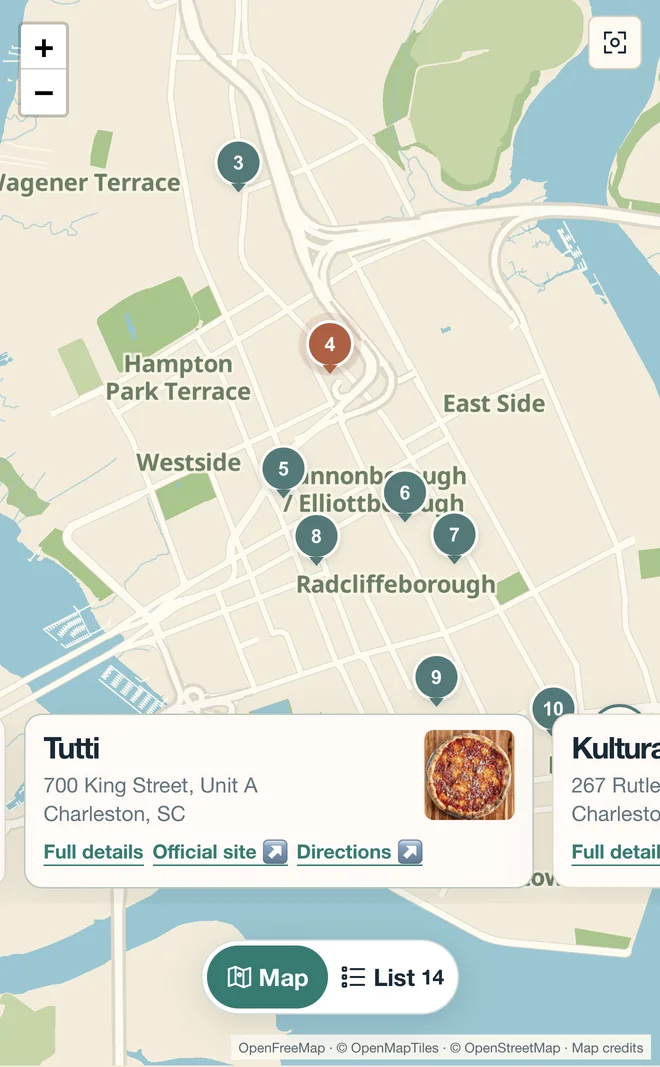
On a computer, scroll the restaurant list and watch the map follow the entry in view. On a phone, swipe the compact place cards and see the selected pin change. You can also select a pin to explore its place.
The interactive map below is the existing HiddenSetting-hosted demonstration, embedded here on MapEdition. It loads when you choose to explore it.
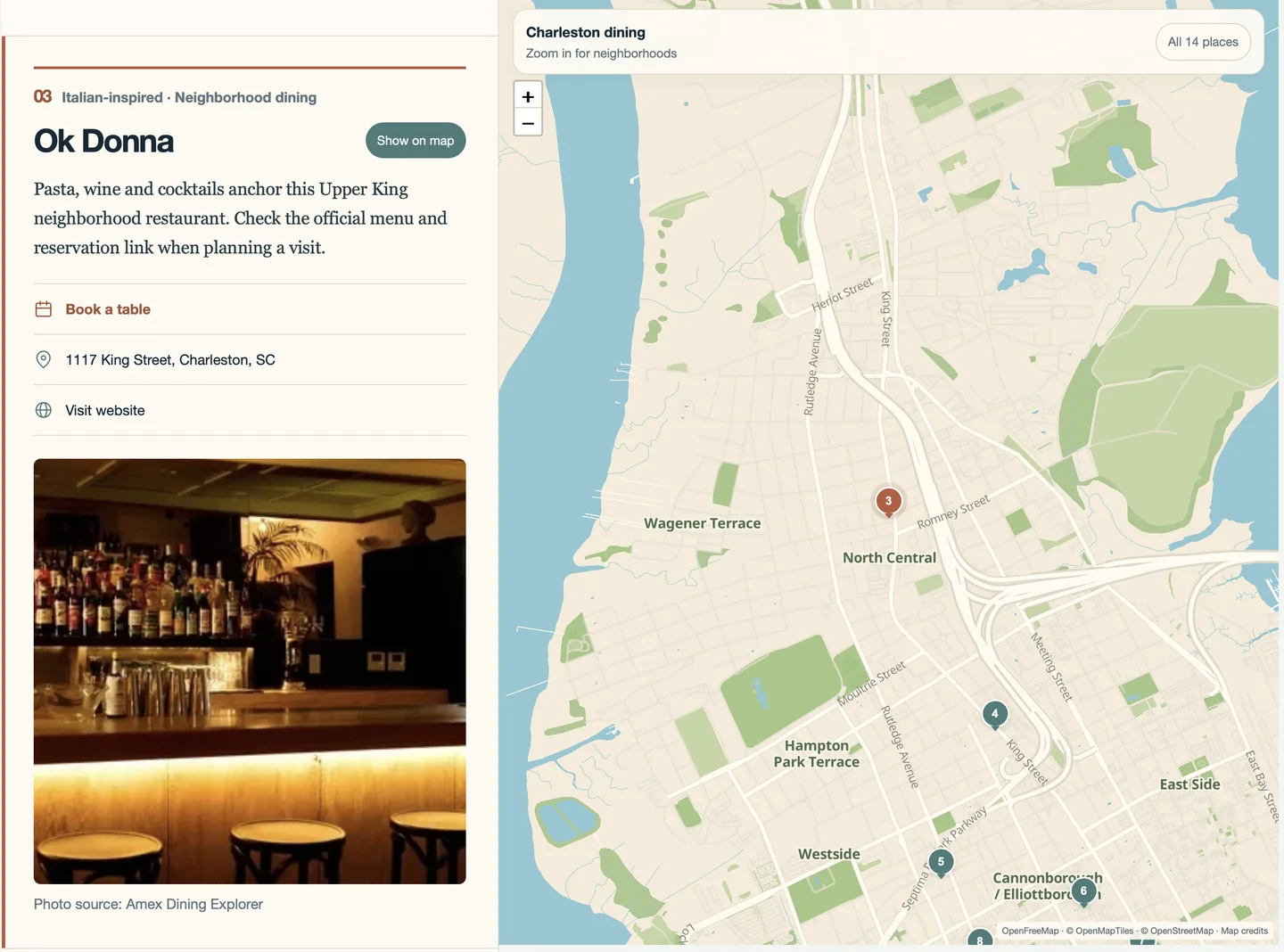
Open the archived map in its own tab. This also gives the map more room on a small screen.
The brief: keep the writing and the geography together.
The demonstration explores a simple publishing problem: a restaurant article can explain why a place matters, but readers still need to understand where it is and what else sits nearby. A separate location search interrupts that connection.
The design brief for this example is to make a selected dining list explorable while retaining the editorial entry. The map follows the story, and choosing a place on the map brings its corresponding content forward. It is a demonstration brief, rather than a claim about a customer's requirements or results.
What goes into the restaurant entries?
The archived collection includes 14 Charleston-area venues, spanning the peninsula and surrounding communities. Each entry combines a name, category, short description, address, photograph, and useful official links. Where the archived entry includes a booking link, readers can continue to that external service.
The writing gives a reader context that a bare pin cannot: the kind of meal, the setting, or why the stop belongs in the collection. The practical links give that interest a next step. This is a connected editorial guide, rather than a real-time restaurant database or reservation system.
The restaurant selection is credited to Eater Carolinas in the source demonstration; the summaries were prepared for HiddenSetting. Photo-source credits and map-provider attribution remain in the working map. There is no affiliation with or endorsement by Eater or the featured restaurants. The January selection and links should not be treated as current recommendations.
Design decisions you can see in the map.
- A selected place stays identifiable. Numbered pins tie the geography to the entries, with a different treatment for the selected place.
- Shared addresses need context. Two venues in the collection share an address. Their entries remain distinct, so one location does not imply one restaurant.
- Photos support the writing. The image sits with the place information instead of making readers leave the guide to understand the setting.
- Links stay close to the decision. Official websites, booking destinations where supplied, and address-based directions are available from the entry.
- The collection has a wider geography. Seeing outlying stops alongside peninsula locations helps readers understand the spread before choosing where to go.
Colors, typography, cards, and map styling can be shaped around a customer's publication. This demonstration's visual identity is an example of those choices, rather than a fixed template every customer receives.
One collection, two ways to browse.
On desktop: the longer restaurant entries and map share the available space. Scroll the list to follow the selection across the city, or choose a map location to bring its entry forward.
On a phone: the map uses compact cards that readers can swipe between. The selected place stays connected to its pin, and full details remain available when readers want more context. Try the gesture itself in the working map above.
A map can be embedded or have a dedicated home.
This page pairs an embedded working example with a written explanation. The same collection can also have its own map page, linked from articles, a website menu, or a newsletter. A publisher using Substack can link to a separately hosted map on a branded subdomain.
We choose the route with you and your developer based on the actual platform, available space, and audience. See concrete examples of embeds, standalone pages, and branded subdomains.
What would we need for your map?
You do not need to arrive with 14 polished entries or technical specifications. Start with an area and an idea, send a favorite-place list, or provide finished writing and permitted photographs. We agree the selection, help prepare the content, and build a working preview for review.
For a restaurant publication, that might mean connecting your existing reviews. For a hotel, it might mean a smaller local edit centered on the property. The content, design, links, and any additional features are discussed around your project, then refined with feedback by email or Zoom.
This example demonstrates the interface. It does not establish a measured increase in readership, repeat visits, or bookings. A future customer case study can document those outcomes when there is evidence to support them.
Explore interactive dining maps for publishers or read how to start with as much or as little input as you like.
Let’s build your map.
Tell us what you want people to explore. We’ll start with a conversation and shape the map around your audience.
Let’s build your map